Audio Sources
- YouTube
- Spotify
- SoundCloud
- Apple Music
Queueing Music
You can queue music with theplay command.
Managing the Queue
You can manage the queue with the following commandsViewing the tracks in the queue
Viewing the tracks in the queue
Use the 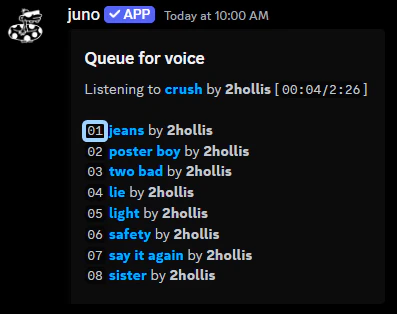
queue command to view the tracks in the queue.
Each track has a corresponding position which can be used to interact with the queue.Removing a track from the queue
Removing a track from the queue
Use the
queue remove command to remove a track from the queue.
You must provide the track position which can be found with the queue command.Moving a track in the queue
Moving a track in the queue
Use the
queue move command to move a track in the queue.
You must provide the current position and the new position.Auto playing similar tracks
Auto playing similar tracks
Use the
queue autoplay command to toggle auto play.
Whenever your queue is empty, juno will automatically play similar tracks which are related to the last track played.Shuffling the queue
Shuffling the queue
Use the
queue shuffle command to shuffle the queue.Clearing the queue
Clearing the queue
Use the
queue clear command to clear the queue.Controlling Playback
You can control playback with the following commandsSkipping to the next track
Skipping to the next track
Use the
skip command to skip to the next track.Pausing & Resuming playback
Pausing & Resuming playback
Use the
pause & resume commands to pause and resume playback.Changing the track volume
Changing the track volume
Use the
volume command to change the volume.Setting the repeat mode
Setting the repeat mode
Use the
repeat command to set the repeat mode.